Raiffeisen Bank · Product design
When automated onboarding isn't enough.
Some identity documents required a human verification step. We designed an operator-side workflow that connected live video calls, document capture, data validation and signature verification into one continuous onboarding process.
Role
Senior Product Designer
Platform
Internal web application
Domain
Digital onboarding / KYC
Users
Bank verification operators
01 — The context
One onboarding journey. Two sides of the experience.
Customer onboarding happened primarily on mobile. But for selected document types — such as an ID card or passport booklet — the process required additional verification with a bank operator. Instead of treating this as a separate offline procedure, we connected it directly to the existing digital onboarding journey.
Customer
- Application
- Questionnaire
- Document type
- Video verification
- Signature
- Continue onboarding
Operator
- Incoming call
- Verify customer
- Capture evidence
- Record document data
- Complete verification
- Review signature
The two tracks run in parallel and meet at video verification — the moment where the digital journey and the human step become one flow.
02 — The problem
A digital flow with a human dependency.
The challenge was not simply to add a video call. During a short conversation, an operator had to establish the customer's identity, collect several types of evidence, enter document information correctly and make a verification decision — while keeping the conversation moving.
See the customer
Maintain the live conversation throughout verification.
Capture evidence
Take and store customer and document photos during the call.
Record identity data
Enter information dictated by the customer and compare it against the documents.
Handle errors and exceptions
Poor connection, missing documents, unreadable images or mismatching information could interrupt the happy path.
Create a verifiable record
All collected evidence had to remain associated with the customer's onboarding case.
03 — Product decision
Keep the operator in one workspace.
Switching between a video tool, customer profile, document storage and data-entry forms would increase cognitive load during an already time-sensitive conversation. We therefore designed the experience around a persistent two-part workspace: live customer context on the left, verification actions and data on the right — so the operator could move through the process without losing visual contact with the customer.
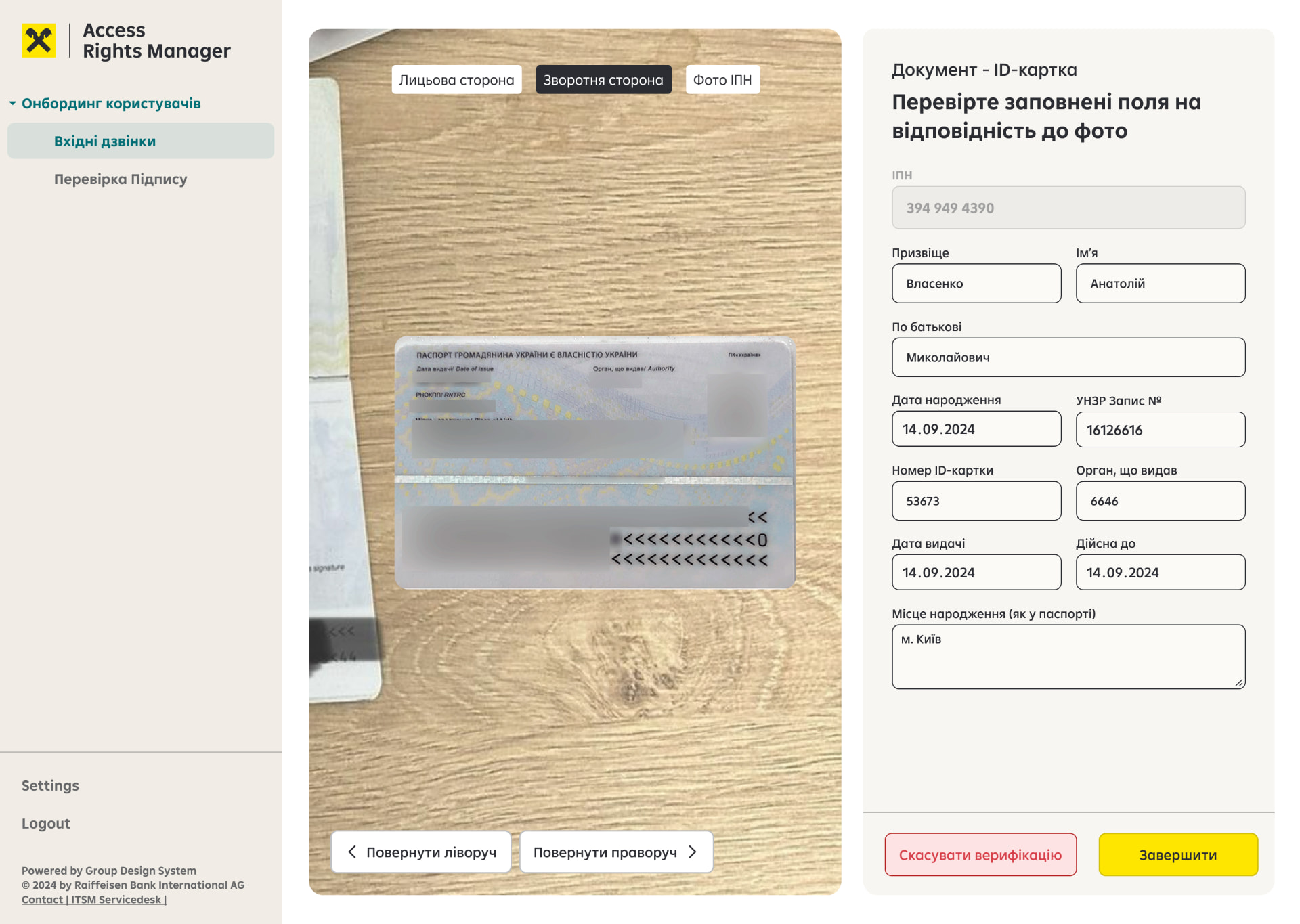
01
Live customer context
02
Guided verification task
03
Customer data
04
Primary next action
04 — The verification flow
One call, structured into clear verification steps.
01 /
Accept the incoming call
Operators could receive onboarding calls from customers waiting for manual identity verification.
The interface kept the queue deliberately simple: availability, incoming calls and the number of customers waiting.
02 /
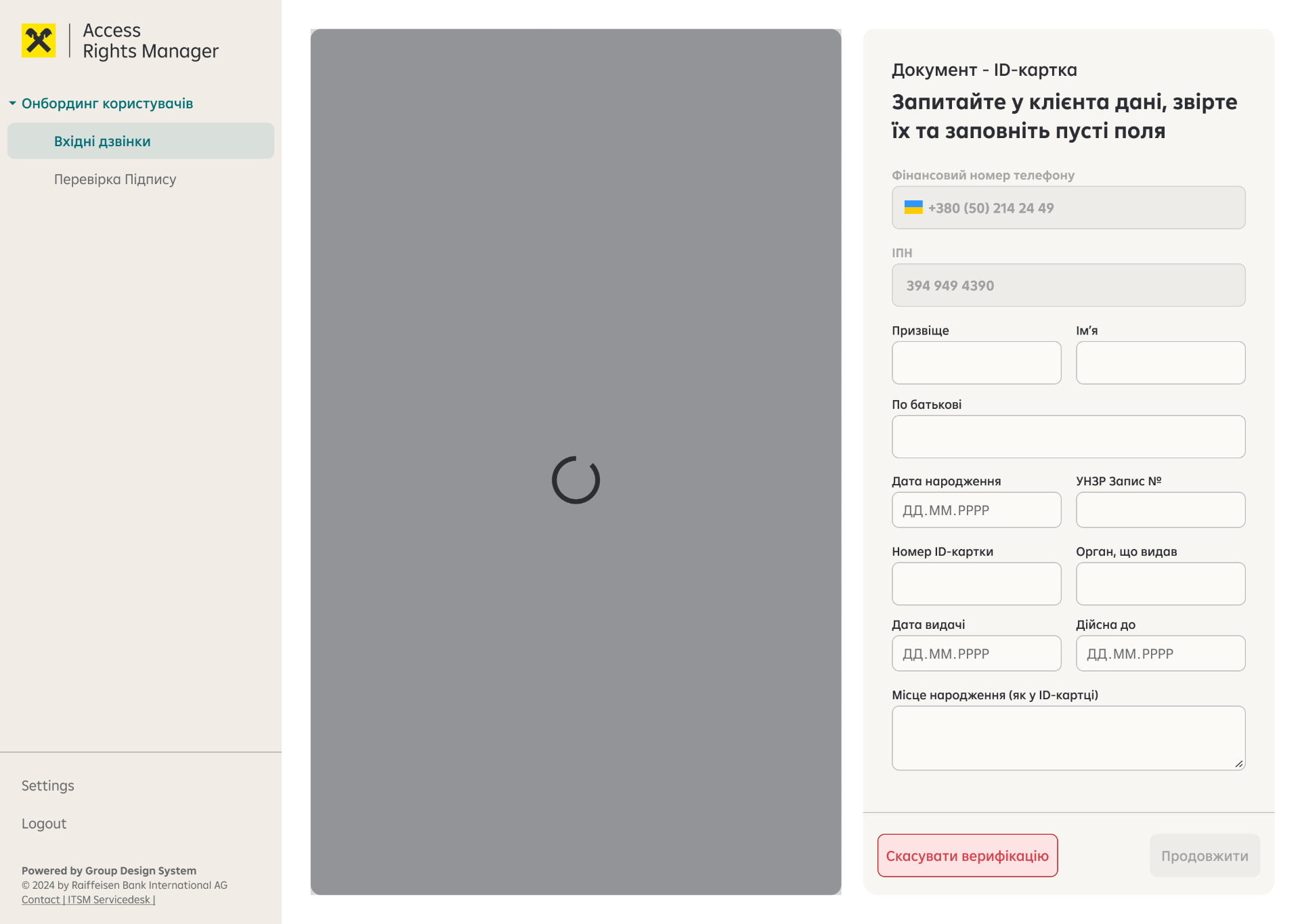
Capture the customer
Once connected, the operator captured the customer's photo directly from the video stream.
The captured image became part of the verification case without requiring a separate upload flow.
03 /
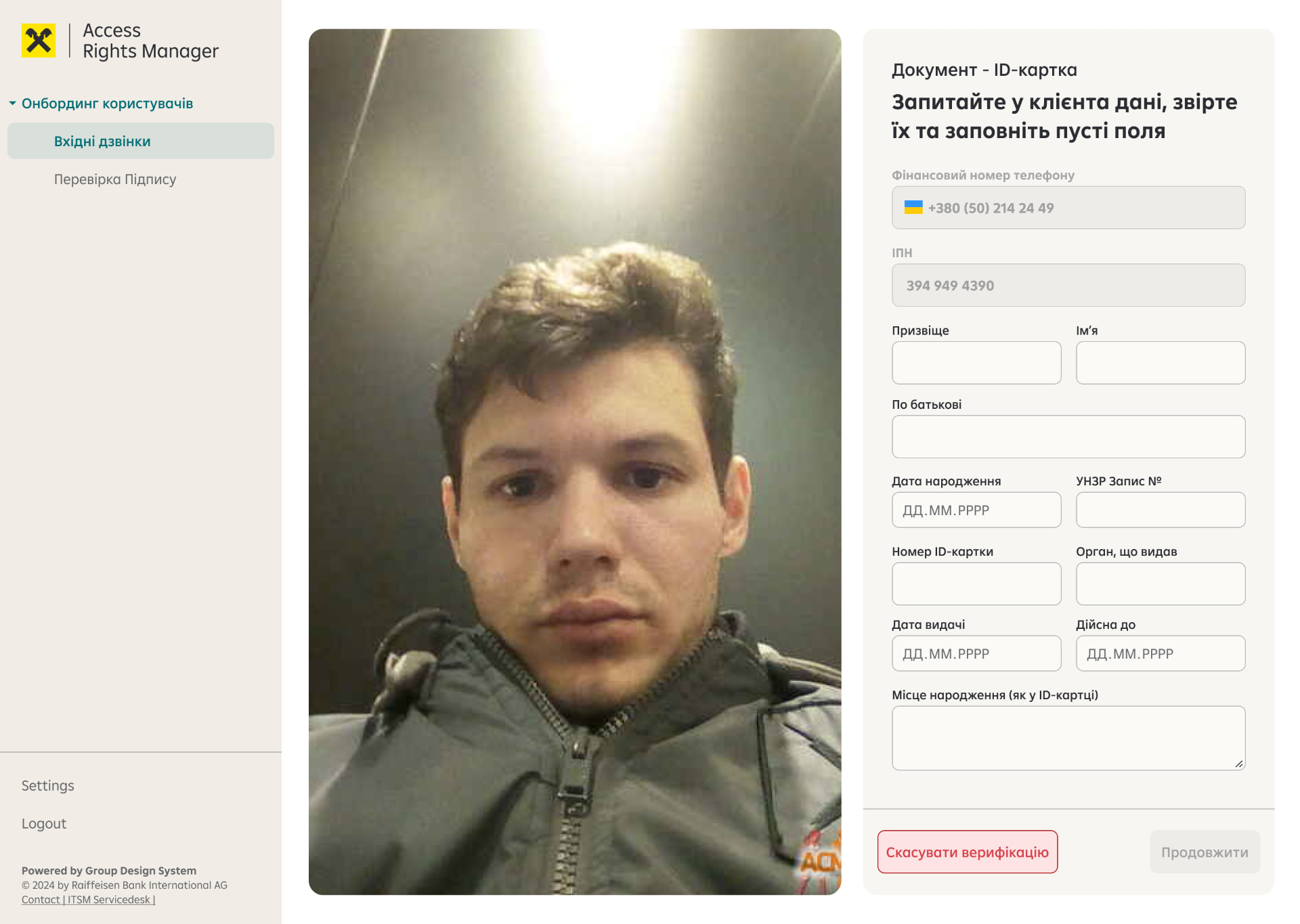
Collect verification evidence
The operator guided the customer through a predefined set of required photos: customer portrait, customer with document, document front/back and additional identification where required.
Captured images remained visible in the workspace, so the operator could immediately see what had already been collected and what was still missing.
04 /
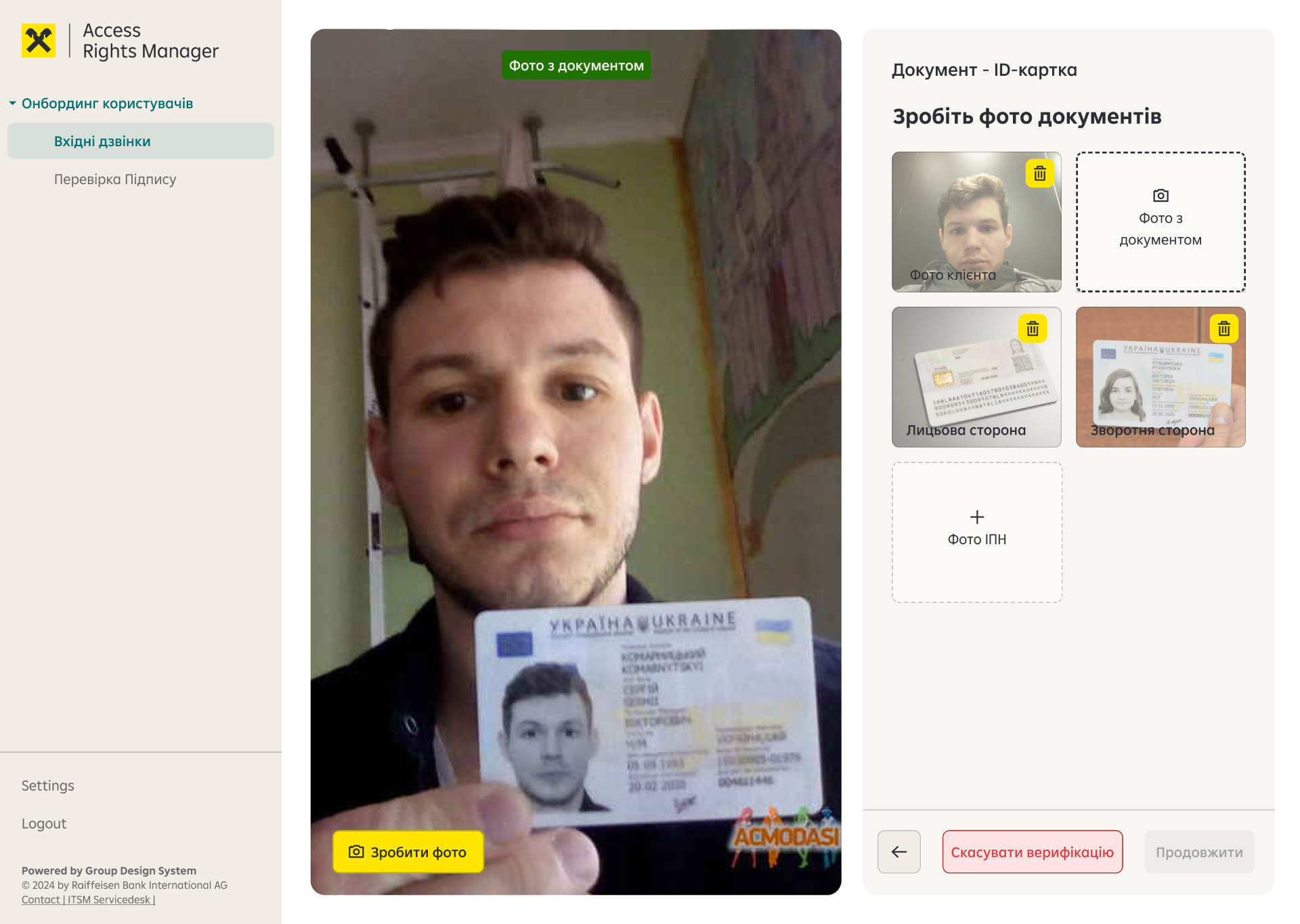
Record the document data
Rather than asking the customer to switch contexts during the call, the operator entered the information while speaking with them.
Fields could then be checked against the captured document.
05 /
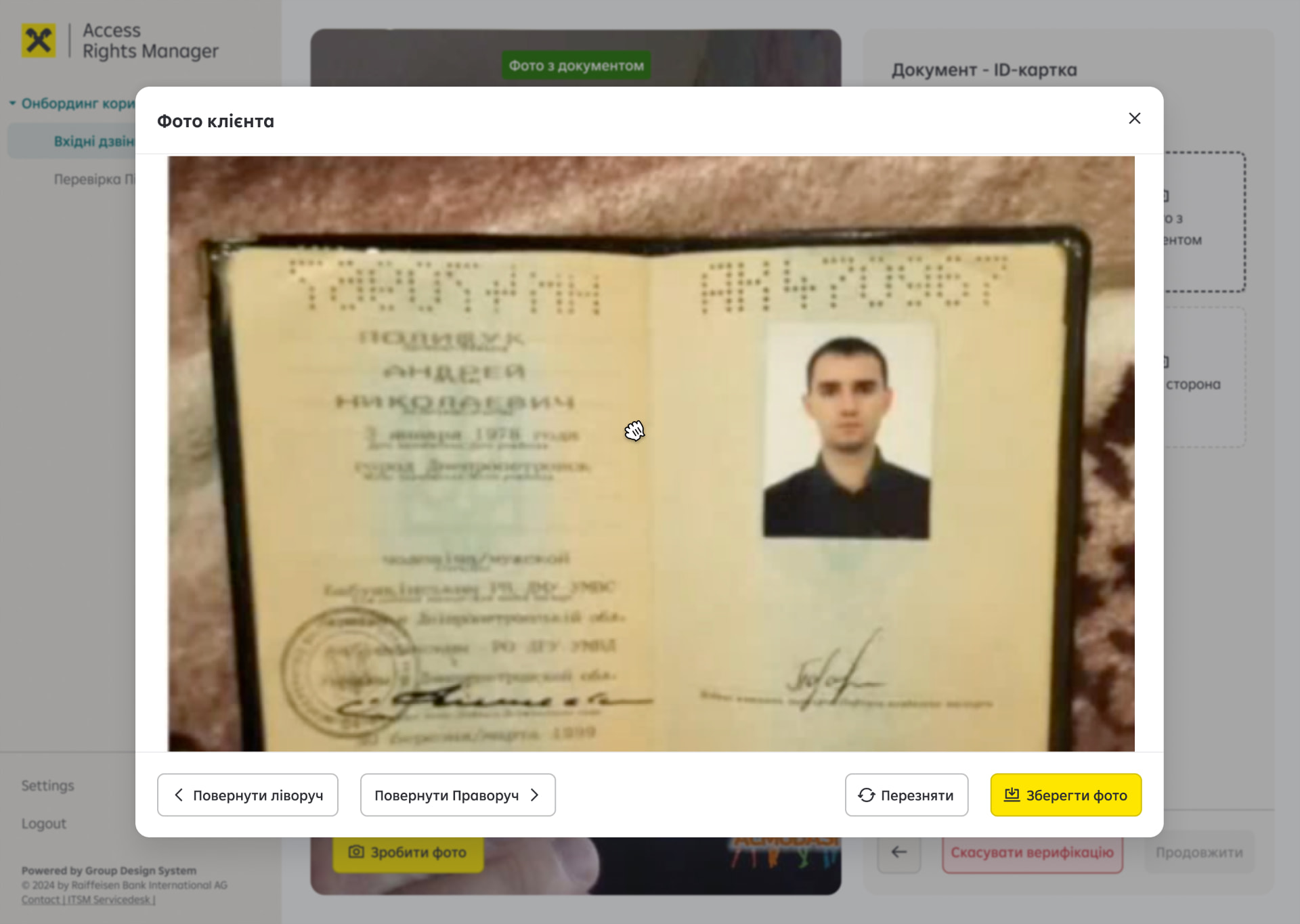
Inspect the evidence
Captured images could be opened in a larger viewer, rotated and retaken when necessary.
This mattered because verification depended not only on having an image, but on the operator being able to inspect it reliably.
06 /
Complete or reject verification
The operator could either complete the verification or stop it and record a reason.
Instead of relying on free-text notes alone, we introduced structured rejection reasons such as unreadable documents, poor connection, missing originals or mismatching information.
Structured rejection reasons
- Unreadable document
- Poor connection
- Missing original document
- Mismatching information
05 — Designing for failure
Verification rarely follows a perfect happy path.
Identity verification is especially sensitive to interruptions and incomplete information. The interface therefore had to make recovery as explicit as progression.
Unreadable document
The operator can stop verification and record a structured reason.
Incorrect data
Inline validation exposes inconsistencies before the operator can continue.
Poor evidence quality
Images can be enlarged, rotated or captured again.
Interrupted verification
Destructive actions require confirmation before ending the session.
The goal wasn't to prevent every exception. It was to make every exception recoverable and explicit.
06 — After the call
Verification continued after the customer left the call.
Once the live verification was completed, the customer continued their onboarding journey and provided a graphical signature on mobile. On the operator side, the collected data, document evidence and signature could then be reviewed as part of the verification process.
Live verification
Talk to the customer, collect evidence, capture information.
Review
Inspect the collected evidence and validate the result without keeping the customer on the call.
07 — Designing for operators
Built for repetition, not exploration.
This wasn't a consumer interface. Operators could repeat the same process many times, so the experience prioritized speed, predictability and clear system state over discovery.
Persistent context
Video and customer context remain visible while tasks change.
Progressive task flow
Operators see the actions relevant to the current verification stage.
Explicit system states
Completed, missing, invalid and destructive actions are visually distinguishable.
Evidence at hand
Captured documents remain accessible without leaving the workflow.
08 — The bigger system
One part of a much larger onboarding platform.
The verification tool wasn't a standalone product. It became part of Raiffeisen's broader internal platform used by different banking services and operator teams. Our onboarding team contributed the verification workflow needed to connect the customer-facing mobile journey with internal banking operations.
Mobile onboarding
- Customer application
- Questionnaire
- Document selection
Video verification
- Customer ↔ Operator
Internal platform
- Customer data
- Documents
- Photos
- Verification result
Onboarding continues
- Signature
- Account activation
09 — Outcome
What the solution enabled.
The new workflow connected a previously human-dependent verification step with the digital onboarding journey. Operators could conduct the call, capture required evidence, record customer information, handle exceptions and complete verification from one structured workspace. For customers, this meant that selecting a document requiring additional verification no longer had to break the digital onboarding experience.
Human verification became a step in the digital journey — not an exit from it.