Raiffeisen Bank · Analytics & data visualization
From manual monitoring to operational intelligence.
Designing an analytics layer for a human-assisted customer verification service — helping operators understand their own performance and giving team leads visibility into workload, quality and operational efficiency.
Role
Senior Product Designer
Scope
Research · UX · Data visualization · Prototyping · Usability testing
Platform
Internal operations tool
Users
Verification operators · Team leads
Concept developed from a real post-launch operational need. The analytics layer was researched and prototyped, but was not fully implemented in production.
Open the interactive prototype01 — The context
A new digital flow created a new operational challenge.
After video verification launched, part of customer onboarding was no longer fully automated. Operators checked documents, ran video verification and reviewed signatures. The service worked — but a different problem appeared right after launch.
We could operate the service — but we couldn't really see how it was operating.
- When does peak demand happen?
- Do we have enough operators in specific hours?
- How many verifications does one operator actually complete?
- How much does human-assisted verification cost the business?
- Where do rejections and operational bottlenecks appear?
- Which part of the process could be automated?
02 — The problem
The team was making operational decisions from fragmented data.
NO VISIBILITY INTO DEMAND
We couldn't clearly see when customers arrive for video verification.
→ Hard to plan operator shifts.
NO SHARED PERFORMANCE VIEW
Managers collected workload and performance information manually.
→ Hard to spot systemic problems.
NO QUALITY FEEDBACK LOOP
Rejection reasons existed as operational data, but were never turned into product insight.
→ Hard for the onboarding team to know what to fix in the flow itself.
NO COST PICTURE
Human verification costs money.
→ Without throughput, handling time and workload, cost-effectiveness stays a guess.
03 — Two users. Two different questions.
The same operational data had to answer two completely different sets of questions.
OPERATOR
“How am I doing?”
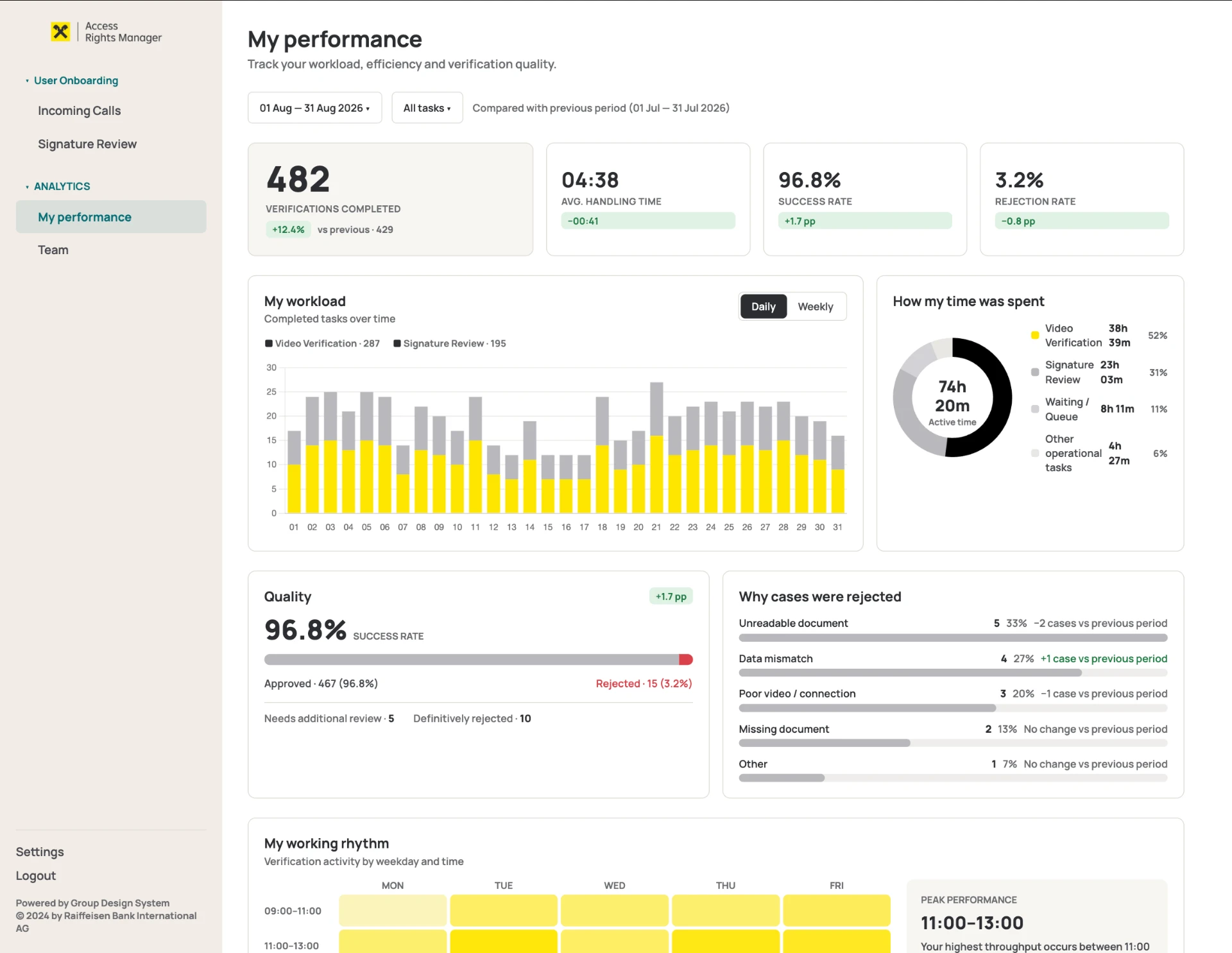
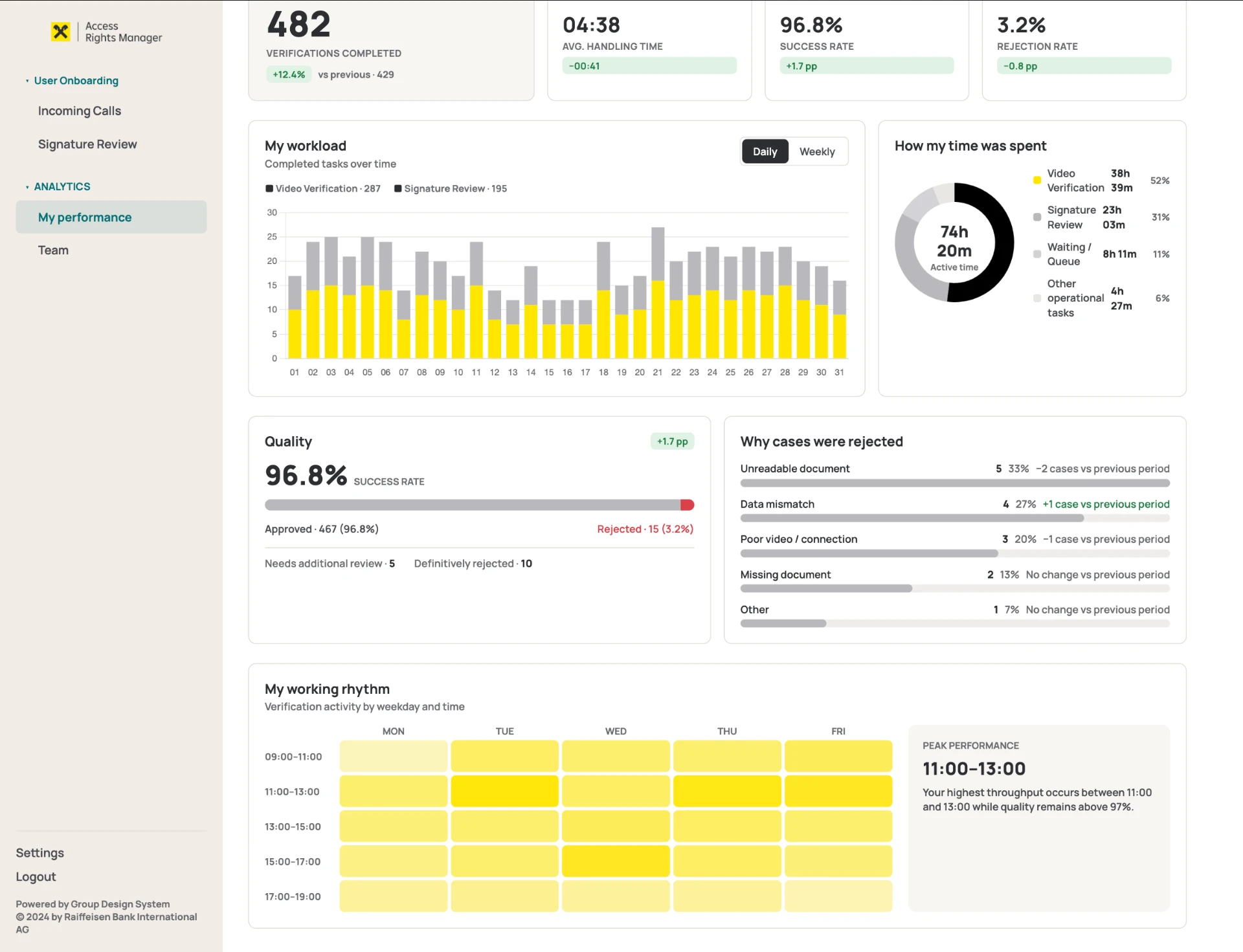
482
Verifications completed
04:38
Avg. handling time
96.8%
Success rate
3.2%
Rejection rate
- When am I most productive?
- What am I spending my time on?
- Why are my cases rejected?
TEAM LEAD
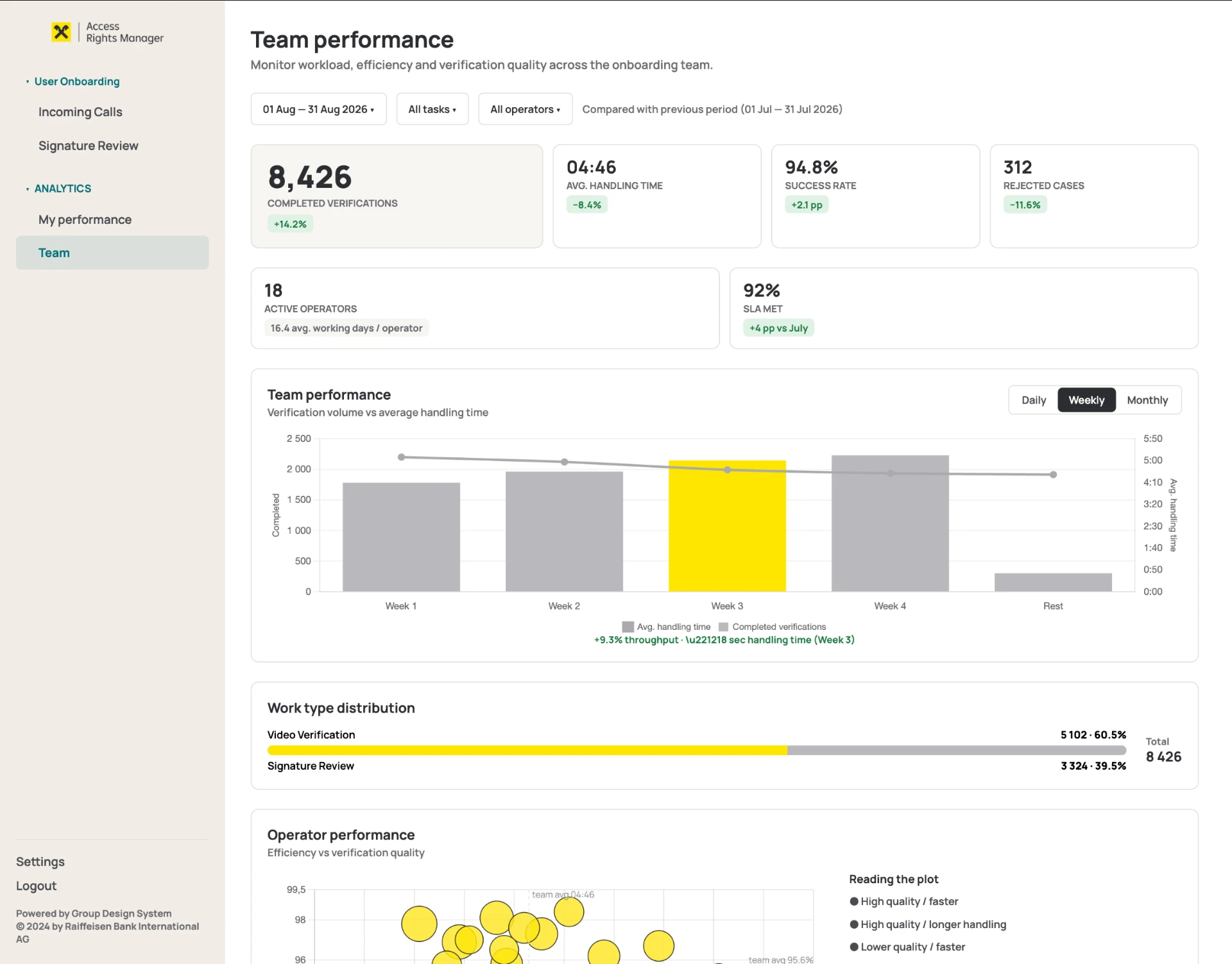
“How is the operation doing?”
8,426
Completed verifications
18
Active operators
04:46
Avg. handling time
94.8%
Success rate
92%
SLA met
312
Rejected cases
- When are we overloaded?
- Who needs support?
- Are we getting faster without sacrificing quality?
- Where are cases dropping out?
- Why are customers being rejected?
04 — Research
I started with the people running the process every day.
I interviewed operators while working on the video verification flow, and after launch collected feedback specifically about operational visibility.
Operator interviews
How they work with the queue, which decisions they make, what they want to see about their own work.
Manager interviews
Which indicators are needed for staffing, performance reviews and business reporting.
Concept testing
Showed designs to operators and managers, gathered feedback, validated interaction patterns.
Task-based usability testing
Checked whether users could find the right information and complete core scenarios, including time-to-task.
Workshops
Defined together which metrics are genuinely actionable and which are just nice to know.
Product & tech sessions
Discussed data availability, feasibility and how the analytics layer could be implemented.
05 — From metrics to decisions
Every visualization had to answer a decision.
06 — Designing the operator view
Personal analytics without turning work into surveillance.
For operators, I intentionally focused the interface on self-awareness rather than ranking. The goal was to help people understand workload, quality and working patterns — not to create a leaderboard.
MY WORKLOAD
Daily throughput split by verification type.
HOW MY TIME WAS SPENT
Where active working time goes.
QUALITY
Successful vs rejected cases.
WHY CASES WERE REJECTED
Actionable reasons instead of a generic error rate.
MY WORKING RHYTHM
Heatmap revealing peak individual productivity.
07 — Designing for managers
From individual performance to operational health.
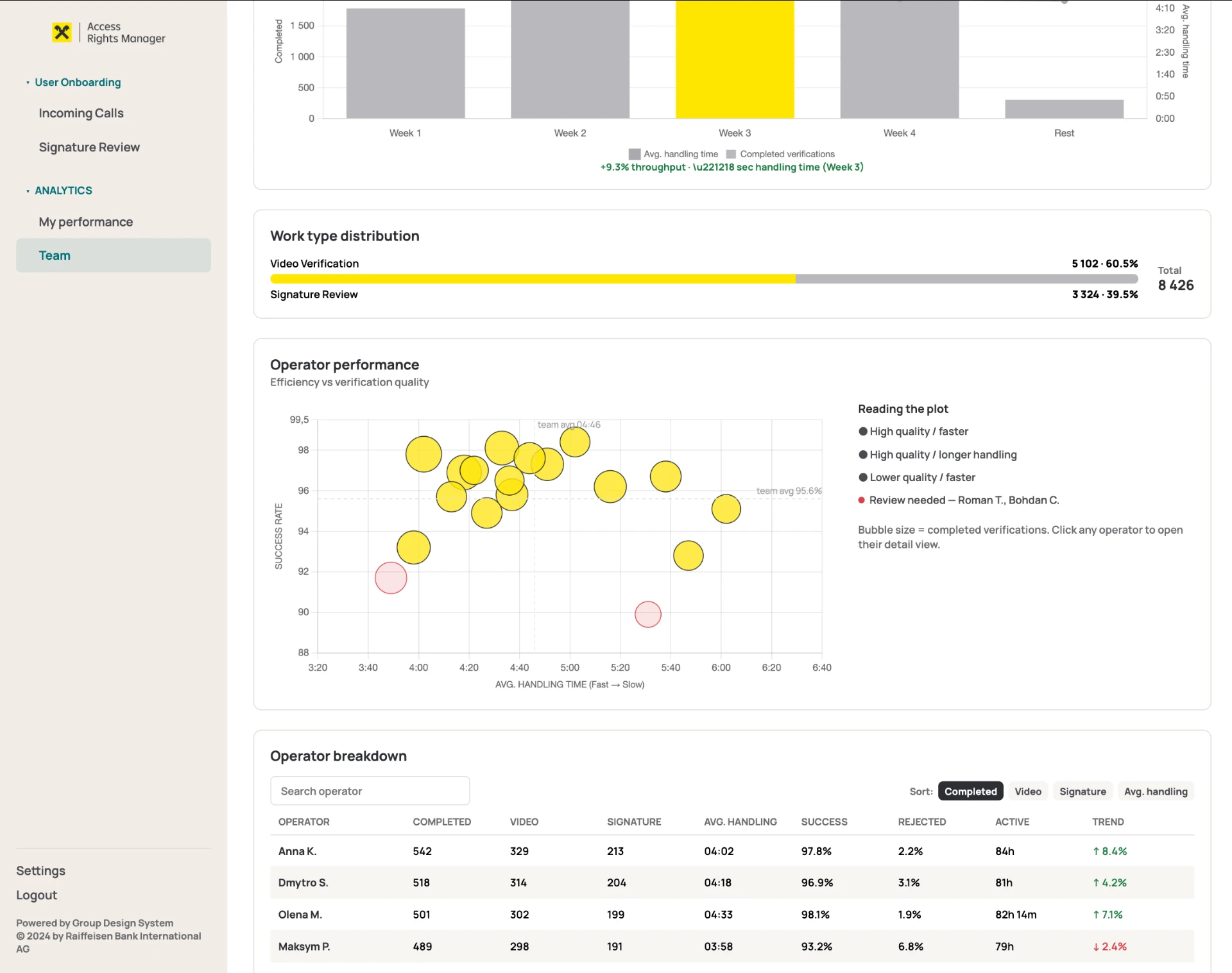
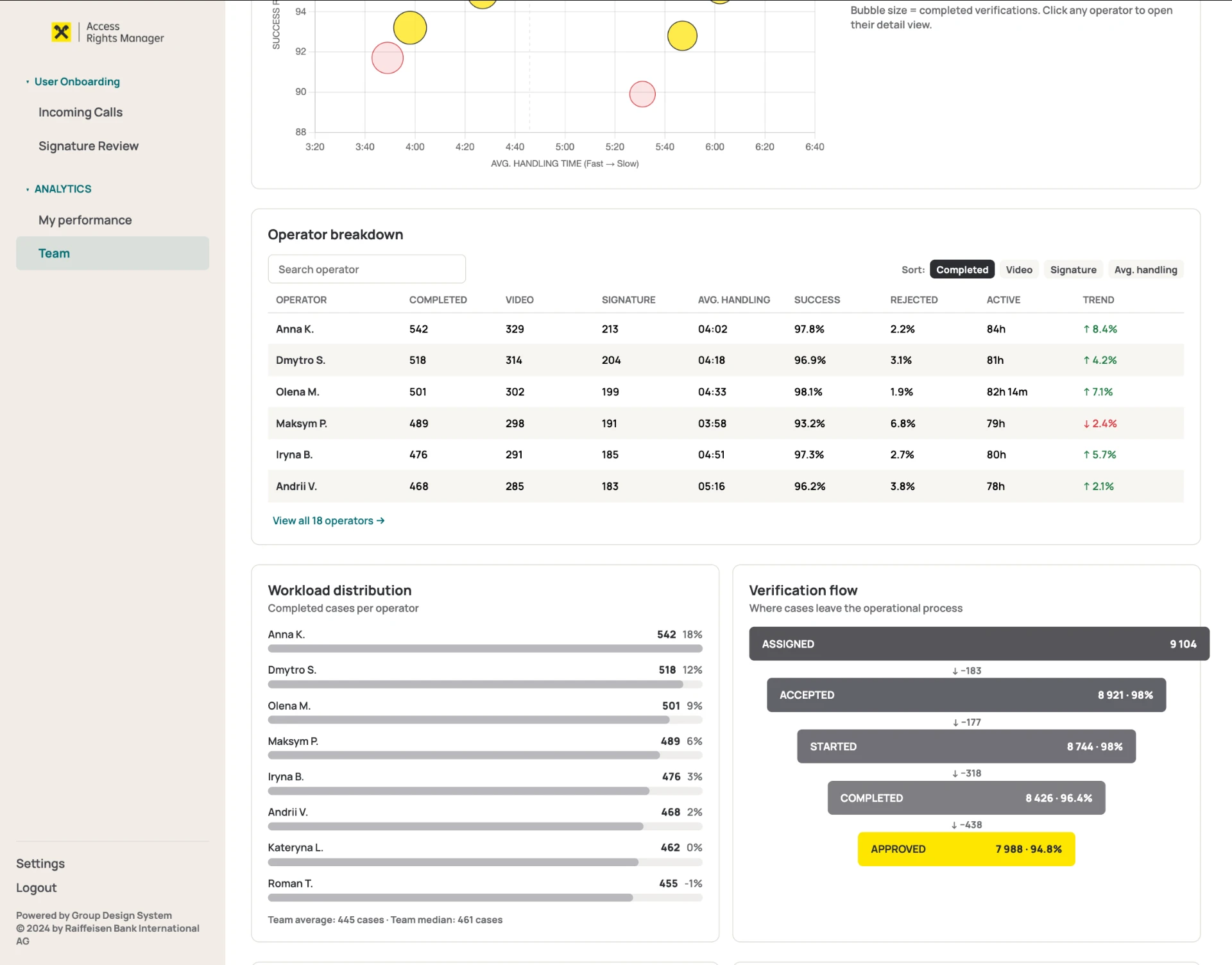
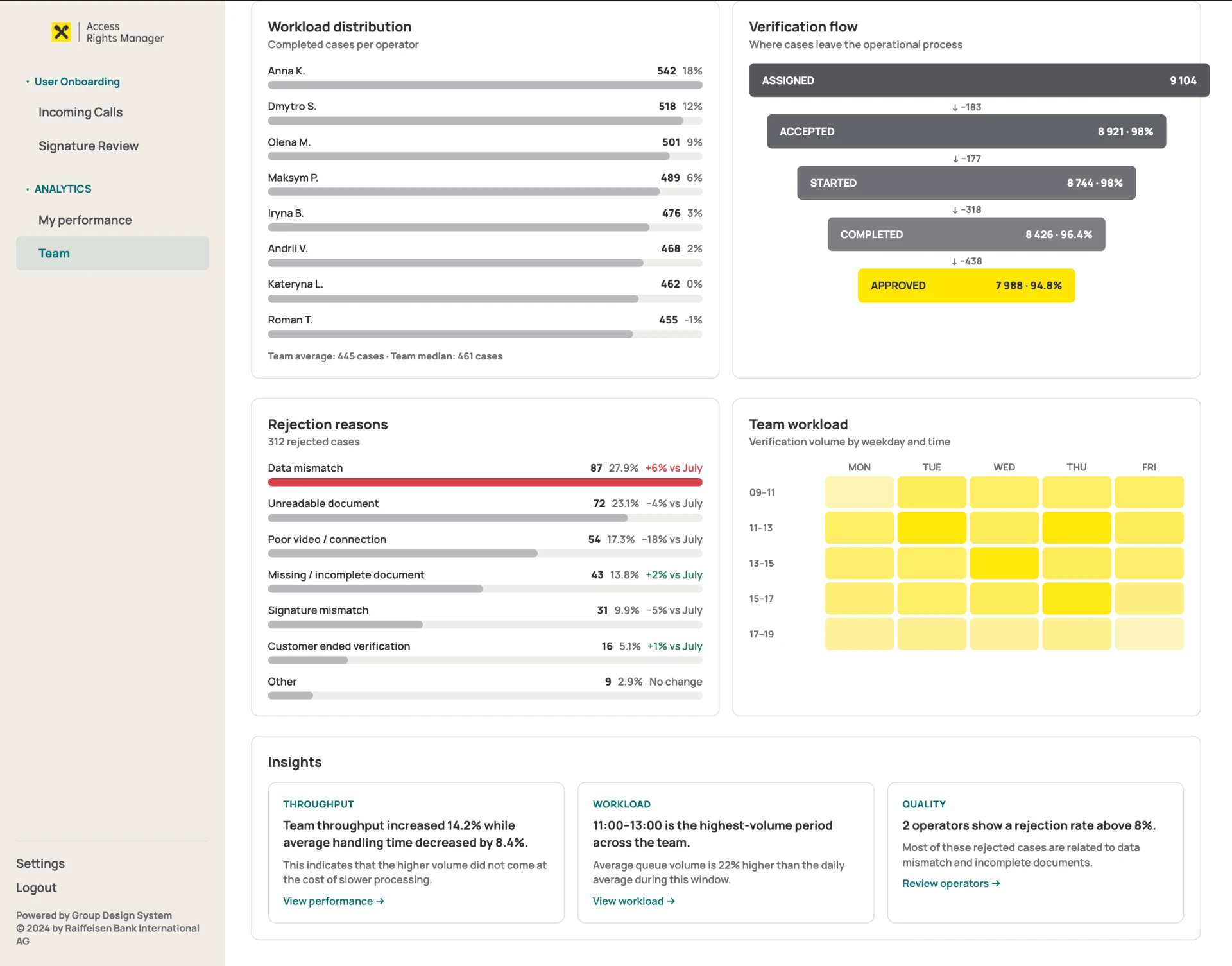
01 — THROUGHPUT × HANDLING TIME
Productivity is never read in isolation. If throughput goes up while handling time also goes up, something is wrong. Here: +9.3% throughput with −18 sec handling time — more cases processed without losing speed.
02 — QUALITY × EFFICIENCY
X = handling time, Y = success rate, bubble size = completed cases. The manager doesn't see 'who is slowest' — they see the relationship between speed, quality and volume.
03 — DEMAND HEATMAP
Thursday 11:00–13:00 isn't just a yellow square. It is a staffing decision.
04 — VERIFICATION FLOW
9,104 assigned → 8,921 accepted → 8,744 started → 8,426 completed → 7,988 approved. Not only the final success rate, but exactly where cases are lost.
Thursday 11:00–13:00 isn't just a yellow square. It is a staffing decision.
08 — Closing the product feedback loop
Operations data became product data.
Data mismatch ↑
→ Unclear instructions, a confusing field or an upstream mismatch in onboarding.
Unreadable document ↑
→ Review camera guidance and the upload UI.
Poor video / connection ↑
→ Review the technical flow.
Missing document ↑
→ Review how requirements are communicated.
The dashboard wasn't only designed to evaluate operators. It was designed to reveal where the product itself was failing users.
09 — Business impact
What this would enable.
Better staffing
Plan operator shifts against real demand.
Lower operational cost
Understand the relationship between workload, handling time and staffing.
Earlier problem detection
Notice quality or throughput drops before they become systemic.
More informed automation
See which parts of the human-assisted flow are worth digitalising.
Product improvement
Use rejection data as a feedback loop for onboarding.
The analytics concept was validated with internal users but was not fully implemented before the initiative was deprioritized. I therefore don't attribute production impact metrics to the dashboard itself.
10 — Technical feasibility
Designed with implementation in mind.
The visualizations were designed around reusable frontend patterns and chart types available through Chart.js, rather than as purely decorative Figma concepts.
Visualization library
Chart.js
UI
React-compatible component architecture
Design
Existing enterprise design system
11 — Interactive prototype
Try the dashboards yourself.
Both views were built as a clickable prototype with real chart behaviour — switch between the operator and team-lead perspectives, change periods and explore the drill-downs.
The prototype opens in a new tab.
Open the interactive prototypeThe challenge wasn't visualizing more data. It was deciding which data could help each role make a better decision.
For operators
Understand my work.
For managers
Understand my team.
For product
Understand where the service fails.
For business
Understand whether the operation scales.